Creator Studio

Creator Studio: your page, guides and courses.

Creator Studio is where vanlife, camping, overland and DIY creators build a page inside RME and publish guides and courses that members buy with Embers. This page describes what Studio does today, including what is not available yet: payout setup, video bonuses and the newer earnings tools. The creator program page covers how to get involved.

Available on Google Play for Android and in TestFlight beta for iPhone.
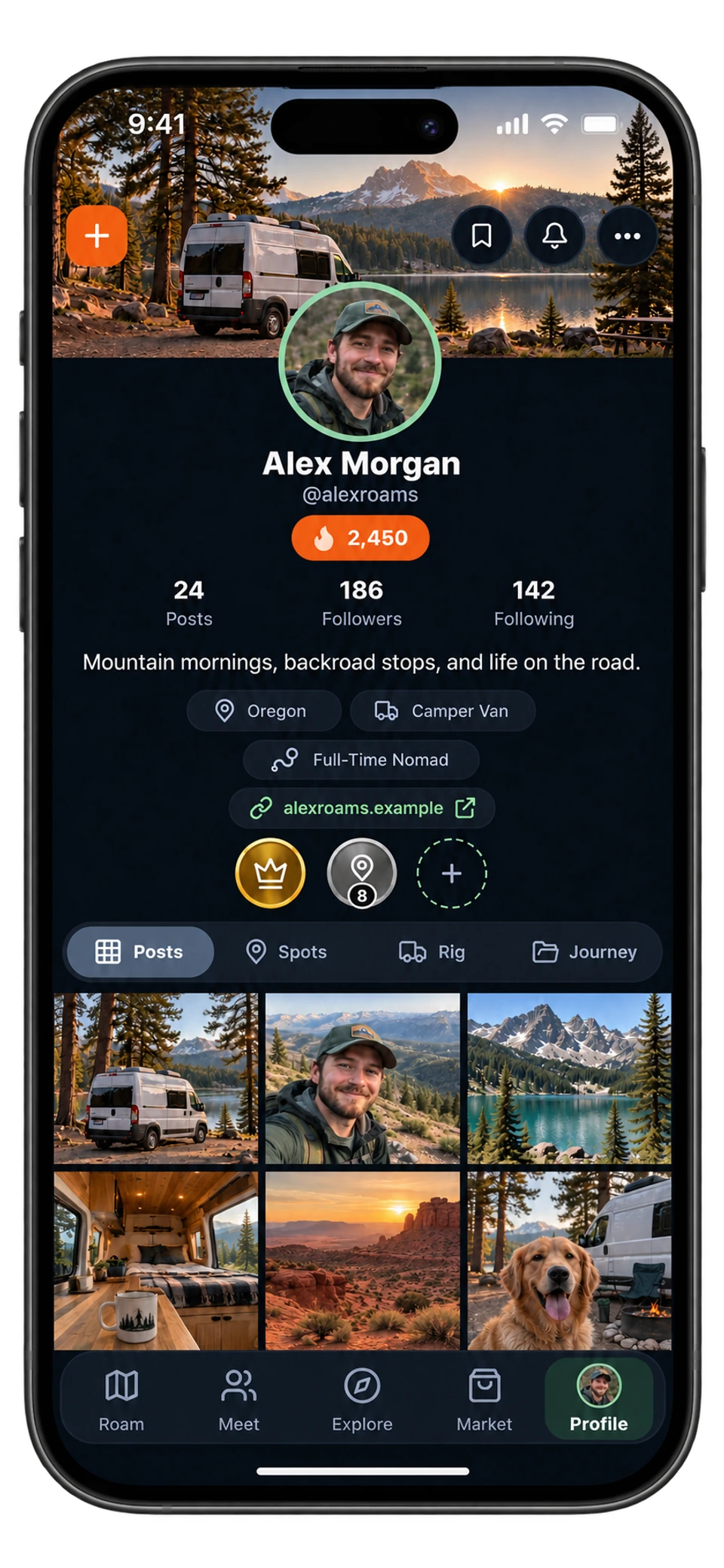
RME app on iPhone: traveler profile with centered avatar, achievements, rig details, and photo grid
Profile · Make it your ownTap the screen for a closer look ↗
The short answer

What Creator Studio does today

You apply with a creator page: a name, categories, links and images. RME reviews it. Approval does not publish anything; nobody but you can open the page until you go live, and later page revisions are reviewed too. Once live, you can publish products: courses and digital products with lessons and private PDF or image files, each with a cover and a price in Embers. Products stay private until you submit them and RME approves them.

You also get a creator code to share in your videos and posts; everyone who signs up or buys with it shows up in Studio. Members can support your page at no extra cost to them, and your approved builds appear in a “My builds” block.
01

A creator page

Name, categories, links and photos, reviewed by RME before it goes live and again after each revision. Only you can see it until then.

02

Guides and courses

Courses, guides, plans, checklists, routes or templates, with lessons and private PDF or image files, priced in Embers. Buyers stay anonymous: you see what was bought, never who bought it.

03

Your creator code

Share it in videos and posts. Sign-ups and purchases made with it show up in Studio. You can change the code; everyone already linked to you stays linked.

A creator’s travel journal with maps, photographs, and adventure keepsakes
In the RME app
How it works in RME

From application to a published guide

  1. 01

    Open Explore → Creators → Creator Studio

    Tap “Become an RME creator” and build your application page: creator page name, categories, links, images.

  2. 02

    Submit for review

    RME reviews the page. While it is pending you can keep editing the private draft; if it needs changes, you are told what to fix and resubmit.

  3. 03

    Create your first guide or course

    Add lessons, a cover and attachments (PDF, JPEG, PNG, WebP, HEIC or HEIF; up to 100 files), set a price in Embers, and submit the product for review.

  4. 04

    Go live and share your code

    Your page appears on the Creators tab. Share your creator code and page link; the Studio shows who linked to it and what you earned.

The Creators tab in Explore, where Creator Studio lives, is included with a free RME account. The app shows current plan details.

Details that matter

Before you count on it.

Earnings and payouts, stated plainly

Guide and course sales pay you in Embers. Your share of a sale is held for 14 days, then you can add it to your Ember wallet. In the app, the payout section says “Payout setup is not available yet,” and video bonuses and the newer earnings tools are also marked not available yet. The app describes the intended model, a payout on the 1st of the month sent by hand, with bank and tax documents never collected in the app, but until payout setup opens, treat earnings as Embers inside RME.

Participation in the creator program is not a paid campaign, a spotlight is never guaranteed and positive coverage is never required.

What a page can hold

  • Courses and digital products with lessons and private files.
  • Builds you have published through Explore, shown in a “My builds” block after approval.
  • Van Blueprints, the floor-plan tool, which lives in the Creators tab.
  • Supporters: members can back your page at no extra cost to them, and you see that support in Studio.
Straight answers

Questions about creator studio.

The details that help you decide how RME fits your next trip.

Do I need a big following to use Creator Studio?

No. The application is reviewed for the page itself: what you teach or share, and whether it fits the community. Useful experience and authentic work matter more than follower count.

How do creators get paid?

Guide and course sales pay in Embers, held for 14 days before they can be added to your Ember wallet. Payout setup to cash is not available yet in the app, and video bonuses are not available yet. The program page and this page will change when that changes.

Can members see who bought my guide?

No. The app keeps members anonymous: you see what was bought, never who bought it.

Is Creator Studio the same as the creator program?

Studio is the tool inside the app. The creator program on /creators is the invitation to use RME, build a page and give feedback, with a chance to be spotlighted.

Is there a fee to publish?

Products are priced in Embers and reviewed before they go live. The app shows any current requirements in Studio; check there before publishing.

Try it on the road

Get out there with RME 1.0.

Available on Google Play for Android and in TestFlight beta for iPhone.

See what's inside

Roam. Meet. Explore. Market.

Four tabs, one app, built for life on the road since July 2021.

What RME does